

Character House Rewards and Expressions: How Progress Works
How the Character House idle loop works: offline rewards, what the gems buy, how levelling grants skill points for expressions, and how two characters interact.
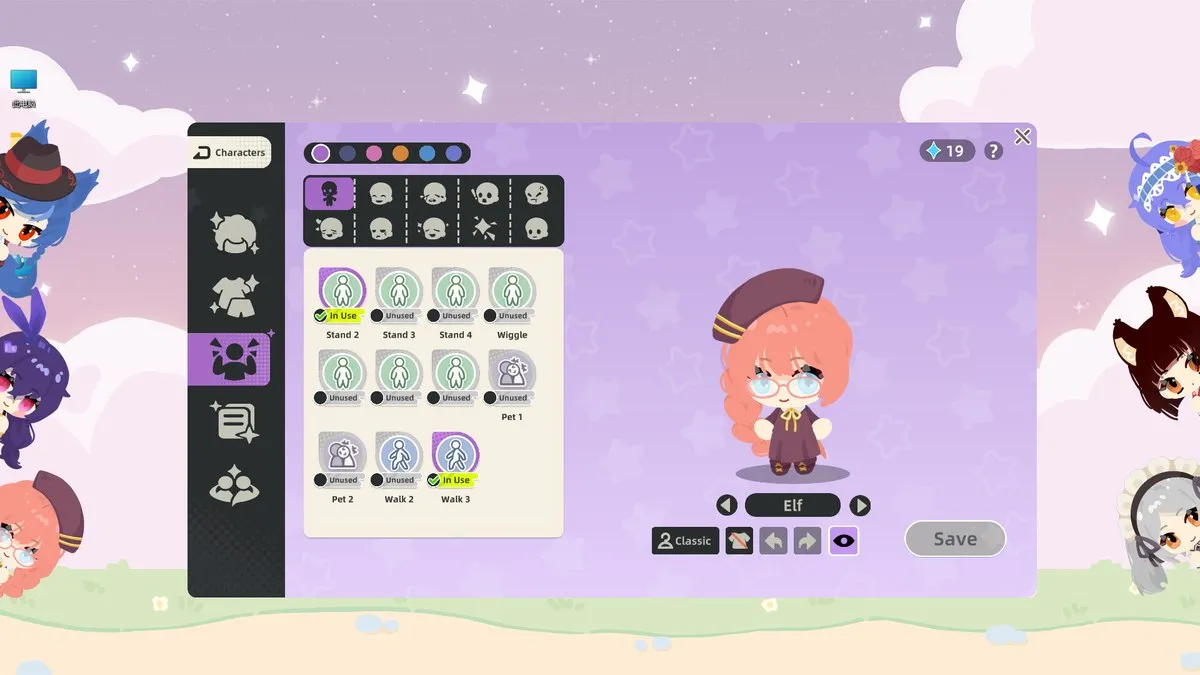
Character House does not have levels to grind in the usual sense. Its progress is driven by ordinary computer use: the app counts keystrokes and mouse clicks, that total feeds a counter, and the counter eventually levels your character up. Each level-up hands you a skill point, and skill points unlock expressions and poses.
The idle loop in one pass
The store page describes the loop as mixing parts, earning rewards even while away from the keyboard, and pulling and crafting accessories. In the demo it plays out like this:
- Keep the character on screen while you work.
- Keystrokes and clicks accumulate into a visible total.
- The total triggers a level-up.
- The level-up announces a character skill point.
- You spend the point on an expression or a pose in the character profile.
That order matters because it explains why the keystroke counter is central to the game and not an optional extra.
What the gems are for
The character profile screen shows a small purple gem total in the corner. In the demo screenshot supplied by the developer it reads 19.
Players describe the gems as the currency you spend on expressions and hats. The game’s own wording for the purple currency is not spelled out anywhere official, so “gems” is the community name for the diamond-shaped counter rather than a developer label.
Accessories themselves come with a rarity tier. The wardrobe screen sorts items into N, R, S and SS tabs, which is the standard gacha ladder and tells you roughly how rare a piece is.
Expressions and poses are separate unlocks
The profile panel holds two different things. The top row shows expression icons, and the list underneath shows poses and actions with names like standing variations, wiggle, pet and walk entries.
Each entry is marked either In Use or Unused, so you can see at a glance what you have unlocked and what is still locked. Unlocking is done with the skill points from level-ups, which is why long-time demo players talk about “farming” the counter simply by doing their day job.
Expressions are not purely cosmetic in use either. According to the developer’s own list of hidden features, a character that has learned the shy action will act shy when you pet it, and a character that has learned anger becomes visibly irritated if you type very fast in typing mode.
Two characters placed together
Drag one character next to another and the app notices. A prompt appears asking whether you want them to bond, and the alternative option is to make them argue.
The developer’s hidden-feature list adds that two characters dragged together will look at each other. The same list mentions that typing mode can move several characters at once, which is the fastest way to arrange a group for this.
What the demo does not do is let characters start interactions on their own. One reviewer with several hours in the demo specifically asked for characters to walk up to each other, talk, argue or dance without being positioned by hand first. That is a request, not a current feature.
What is confirmed and what is not
Confirmed in the demo:
- Offline and idle rewards are advertised by the store page.
- Keystrokes and clicks feed the counter that levels the character.
- Level-ups grant skill points that unlock expressions and poses.
- Accessories have N, R, S and SS rarity tiers.
- Placing two characters together offers a bond or argue interaction.
Not confirmed:
- The exact rate of offline rewards, or whether it matches the online rate.
- Whether the full release keeps the same currency and unlock structure.
- Whether the full game will be paid, free, or include additional purchases. No price has been announced.
Related reading
- What the counter records, and why some players dislike it: keystroke counter and privacy
- Set the character up first: character creation
- Where to place characters and how to move them: desktop modes
Related Articles
guide
Character House Beginner Guide: What To Do First
A first-session plan for Character House Desktop Companion: install the free demo, build one character, pick a desktop mode and learn the right-click menu.
guide
Character Creation in Character House: Parts, Colours and Limits
How the Character House character studio works: the part categories, the colour and gradient tools, the ID card, and the limits players keep running into.
guide
Character House Desktop Modes: Standing, Typing and Corner
The three Character House desktop behaviours compared, plus the right-click settings that stop your character blocking your work.